
简体中文

Laravel Telescope
简介
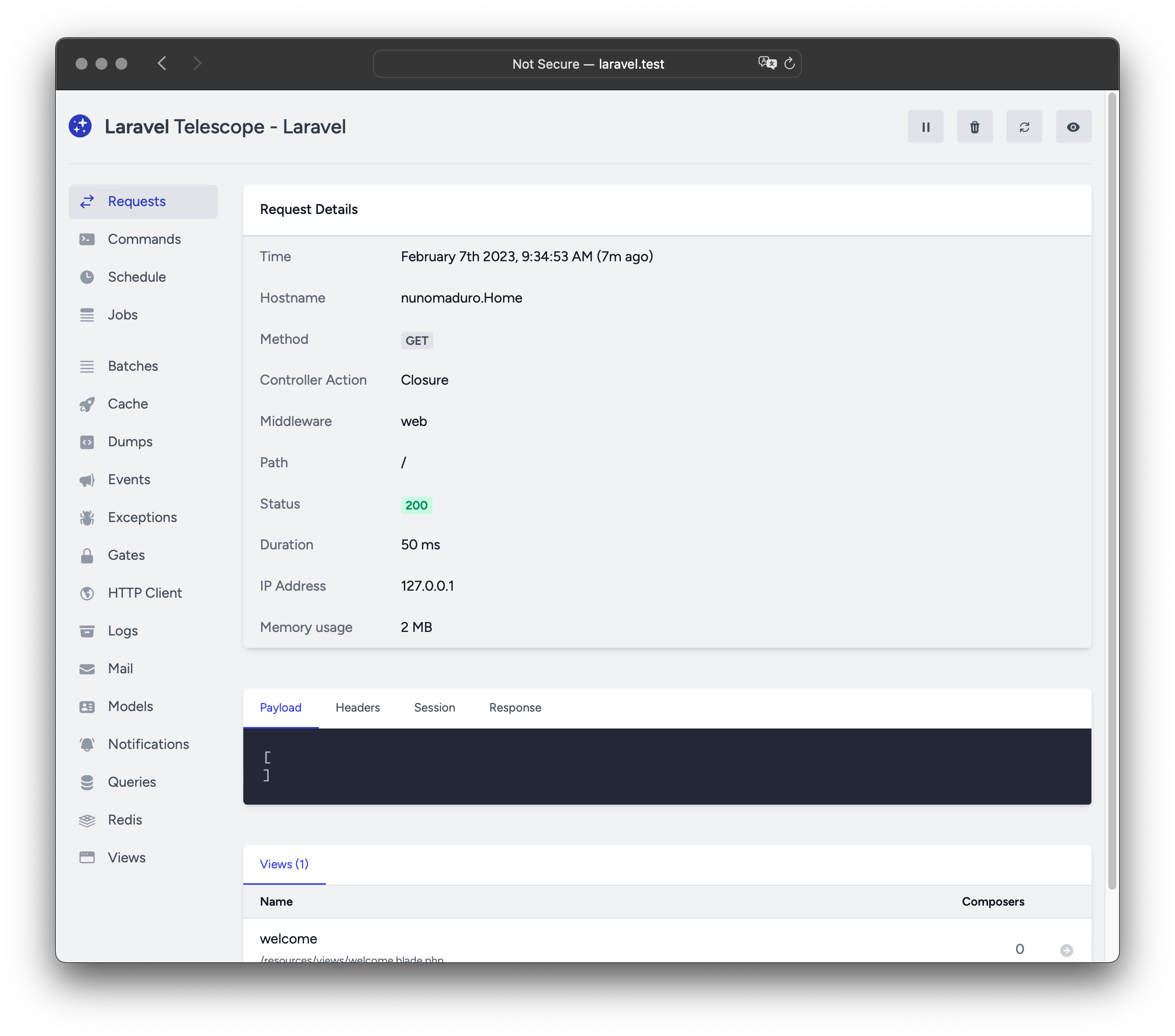
Laravel Telescope 是您本地 Laravel 开发环境的绝佳伴侣。Telescope 提供了对进入应用程序的请求、异常、日志条目、数据库查询、队列任务、邮件、通知、缓存操作、计划任务、变量转储等的洞察。
安装
您可以使用 Composer 包管理器将 Telescope 安装到您的 Laravel 项目中:
shell
composer require laravel/telescope安装 Telescope 后,使用 telescope:install Artisan 命令发布其资源和迁移文件。安装 Telescope 后,您还应该运行 migrate 命令以创建存储 Telescope 数据所需的表:
shell
php artisan telescope:install

php artisan migrate最后,您可以通过 /telescope 路由访问 Telescope 仪表盘。
仅本地安装
如果您只计划使用 Telescope 辅助本地开发,可以使用 --dev 标志安装 Telescope:
shell
composer require laravel/telescope --dev

php artisan telescope:install

php artisan migrate运行 telescope:install 后,您应该从应用程序的 bootstrap/providers.php 配置文件中移除 TelescopeServiceProvider 服务提供者的注册。相反,在 App\Providers\AppServiceProvider 类的 register 方法中手动注册 Telescope 的服务提供者。我们将在注册提供者之前确保当前环境是 local:
php
/**
 * 注册任何应用服务。
 */
public function register(): void
{
    if ($this->app->environment('local') && class_exists(\Laravel\Telescope\TelescopeServiceProvider::class)) {
        $this->app->register(\Laravel\Telescope\TelescopeServiceProvider::class);
        $this->app->register(TelescopeServiceProvider::class);
    }
}最后,您还应通过在 composer.json 文件中添加以下内容来防止 Telescope 包被 自动发现:
json
"extra": {
    "laravel": {
        "dont-discover": [
            "laravel/telescope"
        ]
    }
},配置
发布 Telescope 的资源后,其主配置文件将位于 config/telescope.php。此配置文件允许您配置 观察者选项。每个配置选项都包含对其用途的描述,因此请务必彻底探索此文件。
如果需要,您可以使用 enabled 配置选项完全禁用 Telescope 的数据收集:
php
'enabled' => env('TELESCOPE_ENABLED', true),内容安全策略 (CSP) Nonce
如果您希望将 nonce 属性 用于 Telescope 视图中的脚本和样式标签,以作为您内容安全策略的一部分,您可以使用 Telescope::cspNonce 方法来指定要使用的 nonce。通常应在中间件中调用此方法,以便为每个请求分配一个新的 nonce:
php
use Closure;
use Illuminate\Http\Request;
use Laravel\Telescope\Telescope;
use Symfony\Component\HttpFoundation\Response;

public function handle(Request $request, Closure $next): Response
{
    Telescope::cspNonce('csp-nonce');

    return $next($request);
}您可以将此中间件添加到应用程序的 config/telescope.php 配置文件的 middleware 选项中:
php
'middleware' => [
    'web',
    App\Http\Middleware\AddTelescopeCspNonce::class,
    Authorize::class,
],数据修剪
如果不进行修剪,telescope_entries 表会非常快速地累积记录。为了缓解这种情况,您应该 安排 telescope:prune Artisan 命令每天运行:
php
use Illuminate\Support\Facades\Schedule;

Schedule::command('telescope:prune')->daily();默认情况下,所有超过 24 小时的条目都将被修剪。您可以在调用命令时使用 hours 选项来确定保留 Telescope 数据的时间。例如,以下命令将删除所有创建时间超过 48 小时的记录:
php
use Illuminate\Support\Facades\Schedule;

Schedule::command('telescope:prune --hours=48')->daily();仪表盘授权
Telescope 仪表盘可通过 /telescope 路由访问。默认情况下,您只能在 local 环境中访问此仪表盘。在您的 app/Providers/TelescopeServiceProvider.php 文件中,有一个 授权门卫 定义。此授权门卫控制对 非本地 环境中 Telescope 的访问。您可以根据需要修改此门卫,以限制对 Telescope 安装的访问:
php
use App\Models\User;

/**
 * 注册 Telescope 门卫。
 *
 * 此门卫决定谁可以在非本地环境中访问 Telescope。
 */
protected function gate(): void
{
    Gate::define('viewTelescope', function (User $user) {
        return in_array($user->email, [
            'taylor@laravel.com',
        ]);
    });
}警告
您应确保在生产环境中将 APP_ENV 环境变量更改为 production。否则,您的 Telescope 安装将可公开访问。
升级 Telescope
升级到 Telescope 的新主要版本时,务必仔细查看 升级指南。
此外,升级到任何新的 Telescope 版本时,您应重新发布 Telescope 的资源:
shell
php artisan telescope:publish为保持资源最新并避免未来更新中的问题,您可以将 vendor:publish --tag=laravel-assets 命令添加到应用程序 composer.json 文件的 post-update-cmd 脚本中:
json
{
    "scripts": {
        "post-update-cmd": [
            "@php artisan vendor:publish --tag=laravel-assets --ansi --force"
        ]
    }
}过滤
条目
您可以通过在 App\Providers\TelescopeServiceProvider 类中定义的 filter 闭包来过滤 Telescope 记录的数据。默认情况下,此闭包在 local 环境中记录所有数据,并在所有其他环境中记录异常、失败任务、计划任务以及带有监控标记的数据:
php
use Laravel\Telescope\IncomingEntry;
use Laravel\Telescope\Telescope;

/**
 * 注册任何应用服务。
 */
public function register(): void
{
    $this->hideSensitiveRequestDetails();

    Telescope::filter(function (IncomingEntry $entry) {
        if ($this->app->environment('local')) {
            return true;
        }

        return $entry->isReportableException() ||
            $entry->isFailedJob() ||
            $entry->isScheduledTask() ||
            $entry->isSlowQuery() ||
            $entry->hasMonitoredTag();
    });
}批次
filter 闭包过滤单个条目的数据,而您可以使用 filterBatch 方法来注册一个闭包,过滤给定请求或控制台命令的所有数据。如果闭包返回 true,则所有条目都将被 Telescope 记录:
php
use Illuminate\Support\Collection;
use Laravel\Telescope\IncomingEntry;
use Laravel\Telescope\Telescope;

/**
 * 注册任何应用服务。
 */
public function register(): void
{
    $this->hideSensitiveRequestDetails();

    Telescope::filterBatch(function (Collection $entries) {
        if ($this->app->environment('local')) {
            return true;
        }

        return $entries->contains(function (IncomingEntry $entry) {
            return $entry->isReportableException() ||
                $entry->isFailedJob() ||
                $entry->isScheduledTask() ||
                $entry->isSlowQuery() ||
                $entry->hasMonitoredTag();
            });
    });
}标记
Telescope 允许您通过“标记”搜索条目。通常,标记是 Telescope 自动添加到条目的 Eloquent 模型类名或经过身份验证的用户 ID。有时,您可能希望将自己的自定义标记附加到条目。为此,您可以使用 Telescope::tag 方法。tag 方法接受一个闭包,该闭包应返回一个标记数组。闭包返回的标记将与 Telescope 自动附加到条目的任何标记合并。通常,您应该在 App\Providers\TelescopeServiceProvider 类的 register 方法中调用 tag 方法:
php
use Laravel\Telescope\EntryType;
use Laravel\Telescope\IncomingEntry;
use Laravel\Telescope\Telescope;

/**
 * 注册任何应用服务。
 */
public function register(): void
{
    $this->hideSensitiveRequestDetails();

    Telescope::tag(function (IncomingEntry $entry) {
        return $entry->type === EntryType::REQUEST
            ? ['status:'.$entry->content['response_status']]
            : [];
    });
}可用观察者
当执行请求或控制台命令时,Telescope“观察者”会收集应用程序数据。您可以在 config/telescope.php 配置文件中自定义您想要启用的观察者列表:
php
'watchers' => [
    Watchers\CacheWatcher::class => true,
    Watchers\CommandWatcher::class => true,
    // ...
],某些观察者还允许您提供额外的自定义选项:
php
'watchers' => [
    Watchers\QueryWatcher::class => [
        'enabled' => env('TELESCOPE_QUERY_WATCHER', true),
        'slow' => 100,
    ],
    // ...
],批次观察者
批次观察者记录有关队列 批次 的信息,包括任务和连接信息。
缓存观察者
缓存观察者在缓存键被命中、未命中、更新和遗忘时记录数据。
命令观察者
命令观察者在执行 Artisan 命令时记录参数、选项、退出代码和输出。如果您希望排除某些命令被观察者记录,可以在 config/telescope.php 文件的 ignore 选项中指定这些命令:
php
'watchers' => [
    Watchers\CommandWatcher::class => [
        'enabled' => env('TELESCOPE_COMMAND_WATCHER', true),
        'ignore' => ['key:generate'],
    ],
    // ...
],转储观察者
转储观察者会在 Telescope 中记录并显示您的变量转储。使用 Laravel 时,可以使用全局 dump 函数转储变量。转储观察者选项卡必须在浏览器中打开,转储才会被记录,否则转储将被观察者忽略。
事件观察者
事件观察者记录应用程序分发的任何 事件 的负载、监听器和广播数据。Laravel 框架的内部事件会被事件观察者忽略。
异常观察者
异常观察者记录应用程序抛出的任何可报告异常的数据和堆栈跟踪。
门卫观察者
门卫观察者记录应用程序 门卫和策略 检查的数据和结果。如果您希望排除某些能力被观察者记录,可以在 config/telescope.php 文件的 ignore_abilities 选项中指定这些能力:
php
'watchers' => [
    Watchers\GateWatcher::class => [
        'enabled' => env('TELESCOPE_GATE_WATCHER', true),
        'ignore_abilities' => ['viewNova'],
    ],
    // ...
],HTTP 客户端观察者
HTTP 客户端观察者记录应用程序发出的传出 HTTP 客户端请求。
任务观察者
任务观察者记录应用程序分发的任何 任务 的数据和状态。
日志观察者
日志观察者记录应用程序写入的任何 日志数据。
默认情况下,Telescope 仅记录 error 级别及以上的日志。但是,您可以修改应用程序 config/telescope.php 配置文件中的 level 选项来更改此行为:
php
'watchers' => [
    Watchers\LogWatcher::class => [
        'enabled' => env('TELESCOPE_LOG_WATCHER', true),
        'level' => 'debug',
    ],

    // ...
],邮件观察者
邮件观察者允许您以浏览器内预览的方式查看应用程序发送的 邮件 及其相关数据。您还可以将邮件下载为 .eml 文件。
模型观察者
模型观察者在分派 Eloquent 模型事件 时记录模型更改。您可以通过观察者的 events 选项指定应记录哪些模型事件:
php
'watchers' => [
    Watchers\ModelWatcher::class => [
        'enabled' => env('TELESCOPE_MODEL_WATCHER', true),
        'events' => ['eloquent.created*', 'eloquent.updated*'],
    ],
    // ...
],如果您希望记录在给定请求期间实例化的模型数量,请启用 hydrations 选项:
php
'watchers' => [
    Watchers\ModelWatcher::class => [
        'enabled' => env('TELESCOPE_MODEL_WATCHER', true),
        'events' => ['eloquent.created*', 'eloquent.updated*'],
        'hydrations' => true,
    ],
    // ...
],通知观察者
通知观察者记录应用程序发送的所有 通知。如果通知触发了电子邮件并且您已启用邮件观察者,则该电子邮件也将在邮件观察者屏幕上可供预览。
查询观察者
查询观察者记录应用程序执行的所有查询的原始 SQL、绑定和执行时间。观察者还会将任何慢于 100 毫秒的查询标记为 slow。您可以使用观察者的 slow 选项自定义慢查询阈值:
php
'watchers' => [
    Watchers\QueryWatcher::class => [
        'enabled' => env('TELESCOPE_QUERY_WATCHER', true),
        'slow' => 50,
    ],
    // ...
],Redis 观察者
Redis 观察者记录应用程序执行的所有 Redis 命令。如果您使用 Redis 进行缓存,缓存命令也会被 Redis 观察者记录。
请求观察者
请求观察者记录与应用程序处理的任何请求相关联的请求、头信息、会话和响应数据。您可以通过 size_limit(以 KB 为单位)选项限制记录的响应数据:
php
'watchers' => [
    Watchers\RequestWatcher::class => [
        'enabled' => env('TELESCOPE_REQUEST_WATCHER', true),
        'size_limit' => env('TELESCOPE_RESPONSE_SIZE_LIMIT', 64),
    ],
    // ...
],调度观察者
调度观察者记录应用程序运行的任何 计划任务 的命令和输出。
视图观察者
视图观察者记录渲染视图时使用的 视图 名称、路径、数据和“视图创建者”。
显示用户头像
Telescope 仪表盘会显示保存给定条目时经过身份验证的用户的头像。默认情况下,Telescope 会使用 Gravatar Web 服务检索头像。但是,您可以通过在 App\Providers\TelescopeServiceProvider 类中注册一个回调来自定义头像 URL。该回调将接收用户的 ID 和电子邮件地址,并应返回用户的头像图像 URL:
php
use App\Models\User;
use Laravel\Telescope\Telescope;

/**
 * 注册任何应用服务。
 */
public function register(): void
{
    // ...

    Telescope::avatar(function (?string $id, ?string $email) {
        return ! is_null($id)
            ? '/avatars/'.User::find($id)->avatar_path
            : '/generic-avatar.jpg';
    });
}